Posts Tagged ‘scrapbook’

Great Scrapbooking – Two Layouts I Love

Tuesday, February 9th, 2010

great-scrapbooking

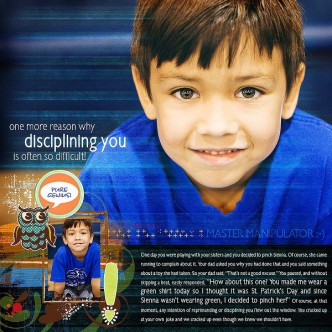
Just a quick scrapbooking note today. I love how these two layouts use blending to create a striking image.

layout1

layout 1

layout2
layout 2

Great Scrapbooking – Little Engineer Digi-Kit

Tuesday, January 26th, 2010

great-scrapbooking

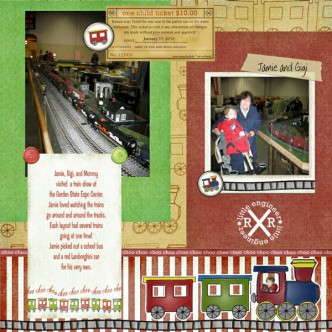
My little boy loves trains (and cars!) so we took him to a train show recently. He was thrilled, and I found out what slot-car racing is… I’m ready to scrap this memorable day and found this adorable kit at Two Peas in a Bucket.  I searched on “train,” and this one came right up after I clicked digital. They also  had a ton of paper scrapbooking train items that I was so tempted by!  This kit is perfect and I’ll use it alot because it’s not too babyish and has a nice selection of good embellishments.
little-engineer

And here’s my happy little layout -

little-engineer2

Daddy’s Little Valentine Scrapbook Page

Tuesday, January 19th, 2010

daddyvalentinescrap

Suprise “Daddy” with his own special Valentine keepsake. This layout is adorable and would look great in one of those 12″x12″ frames made for scrapbook pages. Added to Valentine’s Day and Scrapbooking

Christmas Wednesday – Christmas Scrapbooking 8×10″ Templates and Digi-Scrap Kit

Wednesday, January 6th, 2010

xmas-scrapbooking-kit-free
Time to start scrapbooking the Christmas photos! This lovely Christmas Scrapbooking Kit makes it easy whether you are beginner or an advanced digital scrapbooker since it includes several ready-to-go templates and the entire digital kit used to make the easy printing 8″x10″ quick-pages. Yeah! Added to Christmas Crafts and Scrapbooking

Great Scrapbooking – “Beautiful” Layout

Tuesday, January 5th, 2010

great-scrapbooking

I love browsing scrapbook layout galleries.  The variety of styles and the amazing creativity are such fun! I get so inspired sometimes. So here’s my new idea – once a week I’ll post a great scrapbooking layout. Hopefully, I’ll have time to combine it with another scrapbooking technique – scrap-lifting. By using another layout as my guide, I find that it pushes me in new creative directions.

For example, this layout is called “Beautiful” and isn’t it just wonderful?

Beautiful41

And, here’s my version –

2010-01-05

My layout doesn’t have near as much impact as the original.  I need to duplicate the effect where the photo blends into the background so nicely. A more dramatic photo would be better for such an artistic layout. But I had fun, anyway!

Happy New Year 2010 Word Art Freebie

Friday, January 1st, 2010

HAPPY-NEW-YEAR-2010-WORDART

Happy New Year 2010. Can’t believe I’m writing that, but it’s true! To celebrate, download this Happy New Year 2010 Word Art Freebie. Meant for digital scrapbooking, it’s on a transparent background. The image is in a lovely, ethereal, whimsical, cluttered style that I’m seeing alot lately in digital scrapping.

Digital Scrapbooking Software – Mini Review

Wednesday, December 16th, 2009

digital_scrapbook_artist

Digital Scrapbook Artist is my newest toy. I finally jumped into using it after ordering it last month and it’s kinda addictive… I bought it because it is on a fabulous sale at Amazon – just $10.49 after $10 rebate, which you do online. How could I not try it?
I’ve tried digital scrapbooking with different programs over that last few years and none of them made it so drop-dead simple to create beautiful pages. Unlike photo-editing programs, this program is made for scrapbooking so it has many awesome features just for creating layouts, cutouts, edges, effects, etc. Unlike other scrapbooking programs, it is easy to use and has many of the advanced features tucked away if you want  to use them.
The package I bought comes with a DVD packed with extra digi-kits with lots of backgrounds and embellishments. I already had dozens of free and bought digi-kits I had collected over the years. In just a few steps I added my kits and now all my stuff shows up when I open the program. I can browse through everything and pick and choose from different kits like I did in this page of my son with Santa –

santa-blur

I think I’ve used items from about three kits. When I imported the ornament as a frame, the program automatically cut out the center so I could slide my photo right in. The background was from the same kit. The penguin and Christmas tree are from a free kit from Digital Scrapbook Artist’s community site, where you can download a bunch of freebies to use in the program. The words and ribbon are from another kit I had. In this program, I worked with my layout and tried lots of different embellishments and resized and re-positioned everything until I was happy. I used the eraser tool to make the ornament “hang” on the ribbon. The drop shadow tool gave that extra oomph to everything. What fun!
Then I saved it as an image, and voila, it’s here, and I sent it to family and friends. Eventually, I’ll print it out on my wide-format printer. This page is a standard 12×12, but you can specify any size you want, even change it while working. Very easy.
I’ll post more specifics as I get time, but I just couldn’t help recommending Digital Scrapbook Artist so far, especially with this current deal. If you’ve ever wanted to try digital scrapbooking, go for it!

Baby Scrapbooking Updated

Saturday, December 5th, 2009

baby-scrapbooking

Here’s a few fun projects for scrapbooking baby photos!

Find them and more on the Baby Crafts page and the Scrapbooking page

Holiday Quilling and Much More

Saturday, November 14th, 2009

quilling

Isn’t that just a lovely quilled Fall bouquet? Find that and lots more quilling designs at Whimsiquills. There are designs for many holidays and seasons, plus a few perfect for baby and your manly men, too.  Try quilling for scrapbooking and card-making. There’s something very relaxing about fiddling with  little strips of paper and glue. Added to the Quilling section of Paper Crafts

Handmade Mondays – Picture Stickers

Monday, November 2nd, 2009

handmademonday

Let me see if I can explain this one — You know how babies grow up so fast? Well, these are stickers for your baby’s onesie that help you document the months. The Picture Stickers are colored transparent so they look like part of the shirt and you get a set of 12 to document that adorable first year. It’s such a cute idea for scrapbookers! This Etsy store also has calendar month  and pregnancy style Picture Stickers. Just click to see what I mean…


Best Seller – MISSY FISSY


clothing stickers – FUDDY BUDDY


Best Seller – MISTER FISTER

Congratulations PickySticky for being so creative!